 Woodlot
Run as many as you like.
Never lose track.
Line up Claude Code sessions, one worktree each,
and survey them repository by repository. A Mac app for heavy agent users.
The more you run,
the more you lose track.
Which ones are running, which ones are waiting on you,
and which repository each belongs to. Woodlot fits it all on one screen.
Running or waiting?
You can tell at a glance.
Running cards flow, cards waiting on you pulse, and background-only work gently glows. Color and motion tell you where to look next—no reading required.
Split by repository.
Set it once.
Filter the overview with repository tabs; if something on another tab is waiting on you, its tab pulses. The AI account, GitHub account, browser profile and worktree setup are chosen once per repository.
Carry the conversation
into a new session.
A conversation that grew too long, or a side task you spotted along the way. Write one line about what's next; an AI that has read the conversation writes the handoff and starts a new session in a fresh worktree. Not a word of what you typed is lost.
Small tools for heavy agent users
Built one at a time, from what was missing in daily use.
Sub-sessions
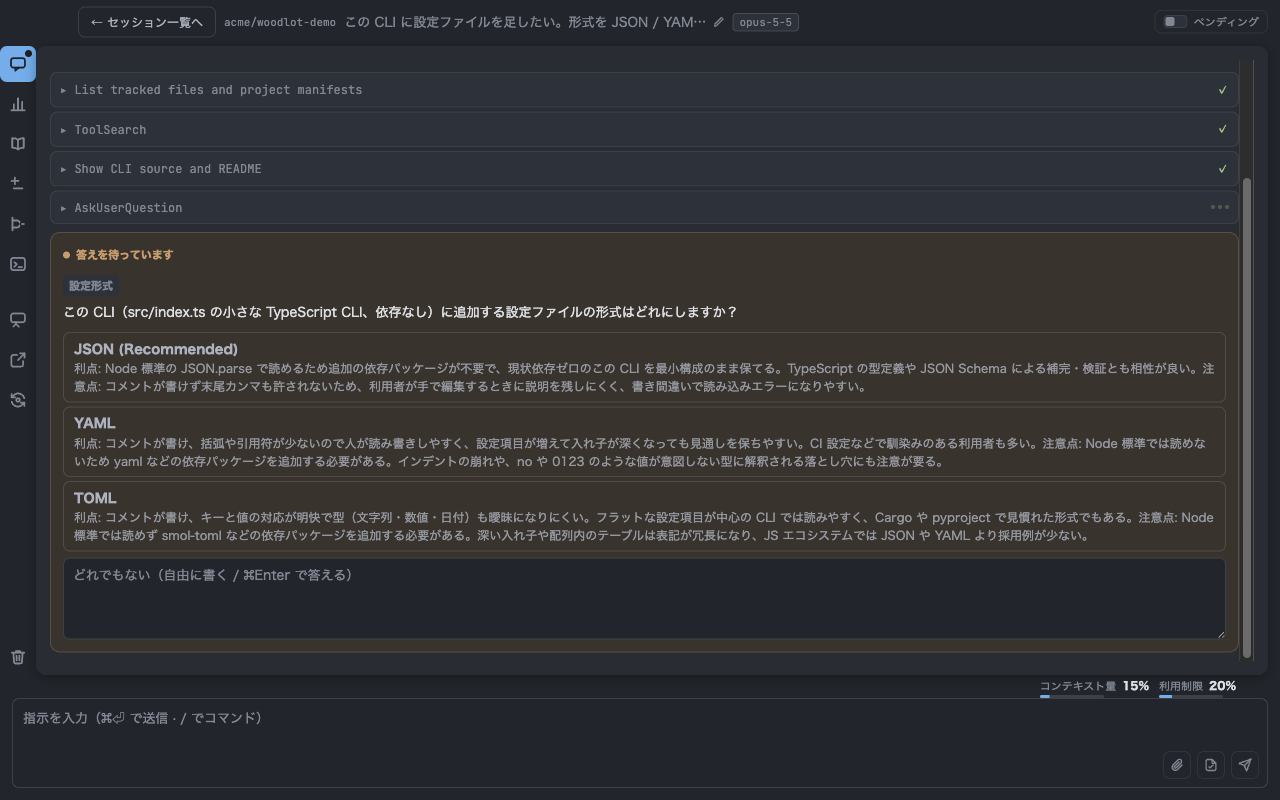
Fork the conversation and ask questions on the side. It's read-only, so the main thread stays clean.
Catch-up
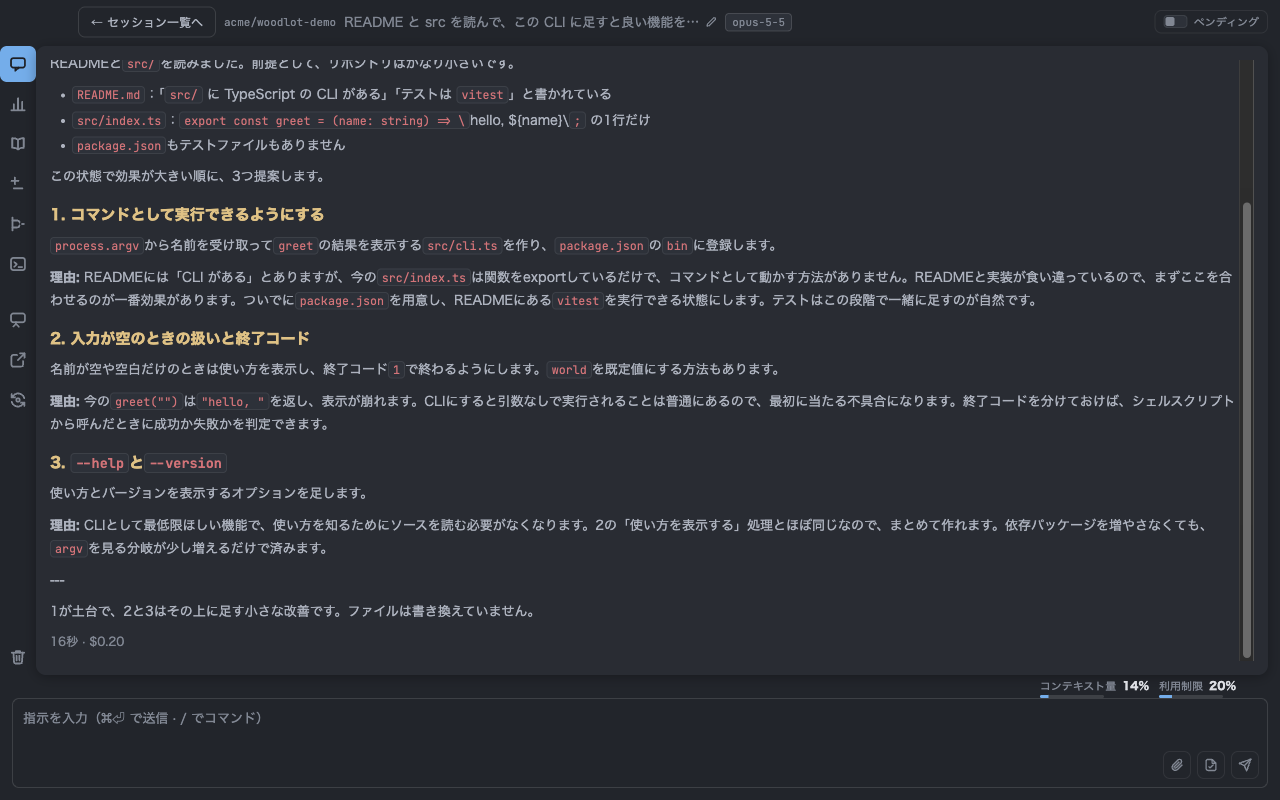
Whatever you missed, summarized by AI into one page you can read in five minutes.
Change track
Local → commits → unpushed → PR. One line shows how far your changes have traveled.
CI watch
Woodlot asks GitHub about your PR's CI itself, so claude doesn't sit there polling.
Autopilot
Flip the switch and just send. It reads the request, picks the right skills, and carries it from settling the spec through to the PR and CI.
Analysis & usage
Context weight and your 5-hour and weekly limits, always on a gauge. Out of quota? Swap accounts and resume.
Hands-off review
It fixes self-review findings, PR review comments and red CI—up to three rounds each—before handing the PR to you.
Pending
Park instructions without starting anything—no worktree, no process.
Terminal
A plain shell inside the session's worktree. Run git or a dev server right there.
Groups
Drop cards onto each other to group sessions that share a goal.
Attachments
⌘V a screenshot, drop a file. Feels just like Slack.
Keyboard first
Start with ⌘N, jump between sessions with ⌘1–6, and get back to the input with ⌘E. ⌘/ lists every key.
The real thing
Get started
Requirements
- An Apple Silicon Mac (macOS 13 or later)
- A Claude subscription and the
claudeCLI, logged in - git (
xcode-select --install) - Optional:
gh(for PRs and CI), Chrome with the Claude in Chrome extension
The wrench in the app checks all of this and shows a one-liner to paste for anything missing.
Three steps
- Open the DMG and drag
Woodlot.appto/Applications - Launch it and allow notifications and folder access
- Click “+ New session”, pick a repository, type an instruction and press ⌘Enter
Updates are automatic: when a new version is out, a banner says so, and one click swaps it in.
See everything.
Hand off more.
Download for Mac
Privacy
- Woodlot itself never sends your code or conversations anywhere. Conversation logs live only on this Mac, under
~/.woodlot - Signing in to Claude happens in Claude Code's own flow. Woodlot never reads, stores, or proxies your credentials or tokens; it launches the Claude Code you installed, unmodified and not bundled
- What does talk to the network is the
claudeCLI (Anthropic) andgh(GitHub), each under your own account and their own terms and privacy policies - To check for updates, the app asks
dl.woodlot.appfor the current version once at launch and every 6 hours (your IP address appears in Cloudflare's access logs). To learn how many installs are in use, these checks are counted by date, country, app version, and an anonymous per-install ID (a random value created on this Mac at first launch; it contains nothing about you or your Mac). Visits to this page are measured with Cloudflare Web Analytics, without cookies, and downloads are counted by date and country only. None of these record your IP address or identify you. There is no other telemetry or analytics - What you write in the support form, along with your email address, arrives as an email at
[email protected]and is used only to reply to you
Terms of Use
All copyright and other rights in Woodlot, including executables and accompanying materials (the “Software”), belong to the copyright holder, masa101127.
1. Grant of License
The copyright holder grants you a non-exclusive, free-of-charge right to use the Software, for both personal and commercial purposes.
2. Restrictions
Unless you have prior written permission from the copyright holder, you may not: (a) redistribute, sell, lend, or publicly transmit all or any part of the Software; (b) modify the Software or create derivative works based on it; (c) reverse engineer, decompile, or disassemble the Software, except to the extent that applicable law expressly permits such activity notwithstanding this limitation.
3. No Warranty
THE SOFTWARE IS PROVIDED “AS IS”, WITHOUT WARRANTY OF ANY KIND, EXPRESS OR IMPLIED, INCLUDING BUT NOT LIMITED TO THE WARRANTIES OF MERCHANTABILITY, FITNESS FOR A PARTICULAR PURPOSE AND NONINFRINGEMENT.
4. Limitation of Liability
IN NO EVENT SHALL THE COPYRIGHT HOLDER BE LIABLE FOR ANY CLAIM, DAMAGES OR OTHER LIABILITY (INCLUDING LOSS OF DATA, BUSINESS INTERRUPTION, OR LOSS OF PROFITS), WHETHER IN AN ACTION OF CONTRACT, TORT OR OTHERWISE, ARISING FROM, OUT OF OR IN CONNECTION WITH THE SOFTWARE OR THE USE OF OR INABILITY TO USE THE SOFTWARE.
If the Japanese and English versions differ, the Japanese version prevails.